Website analytics without cookies
Kundenradar counts how many people visit your website, which pages they read and where they come from. The script sets no cookies and stores nothing in your visitors' browsers.
Start free See it in the example
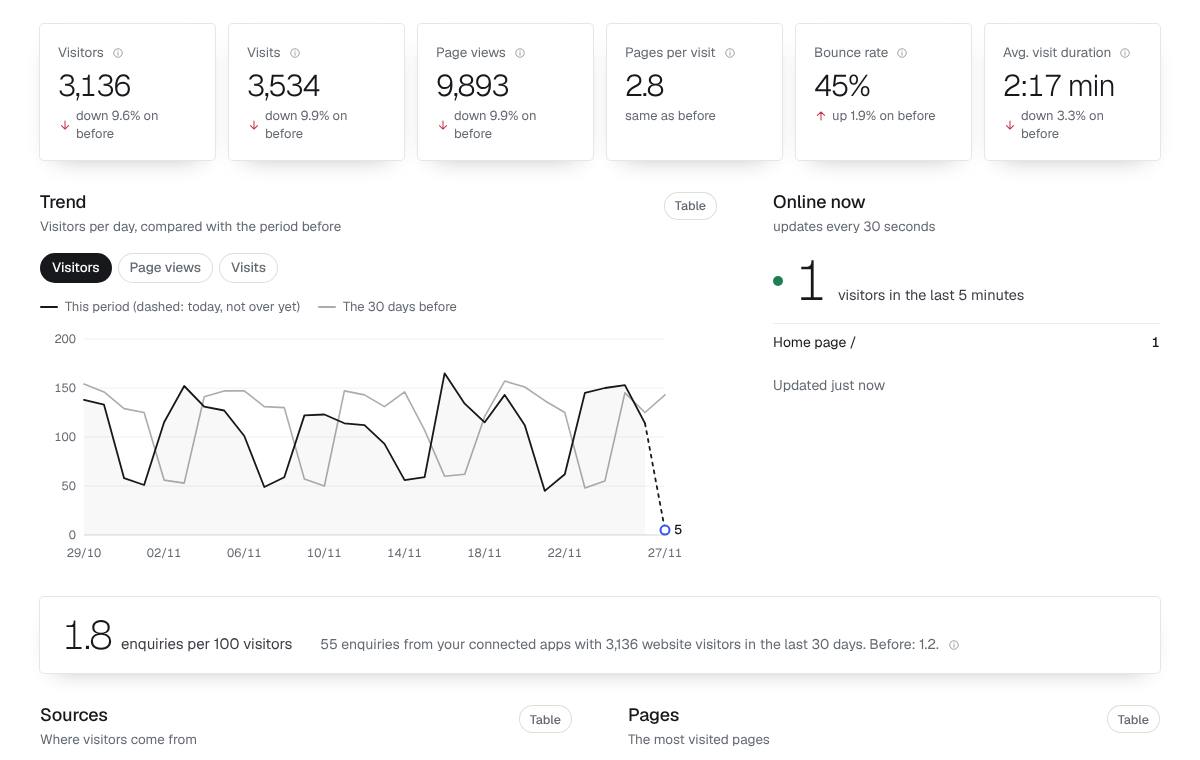
What you see
Visitors, visits, page views and pages per visit, each compared with the period before; the trend per hour, day or month; the most-read pages, the channels (search engines, social networks, links, campaigns with utm tags), device type, language and country; who is on the site right now.
Clicks on phone numbers, e-mail addresses, downloads and links to other sites are counted too, own events such as “appointment booked” with a small addition to the code.
How it counts
The script is about 2 KB. It sends the page path, the utm tags of the address, the domain of the referring site once, and clicks. It reads neither screen size nor language settings; device type and language come from what every browser sends anyway. Visitors with “Do Not Track” or “Global Privacy Control” are not counted.
So that a visitor counts once a day, the server builds a checksum from a random value that changes daily, your website, the IP address and the browser identifier. Random values and single visits are deleted after two days; what remains are daily totals.
Setting it up
In the dashboard under “Website” you get one line of code for your website and guides for common site builders. There is also a paragraph for your own privacy policy that describes what the script does.
Visitors per channel flow into your overview, next to orders, enquiries and new customers from your other apps.
What it is not: no ad or remarketing tracking, no profiles of single people, no recording of mouse movements. Whether your website needs a notice for the analytics is a question for your data protection adviser.